> ## Documentation Index
> Fetch the complete documentation index at: https://docs.vikat.ai/llms.txt
> Use this file to discover all available pages before exploring further.
# Audit Logs
> Track administrative activity in Vikat Enterprise with signed audit events, filtering, and export support.
## Overview
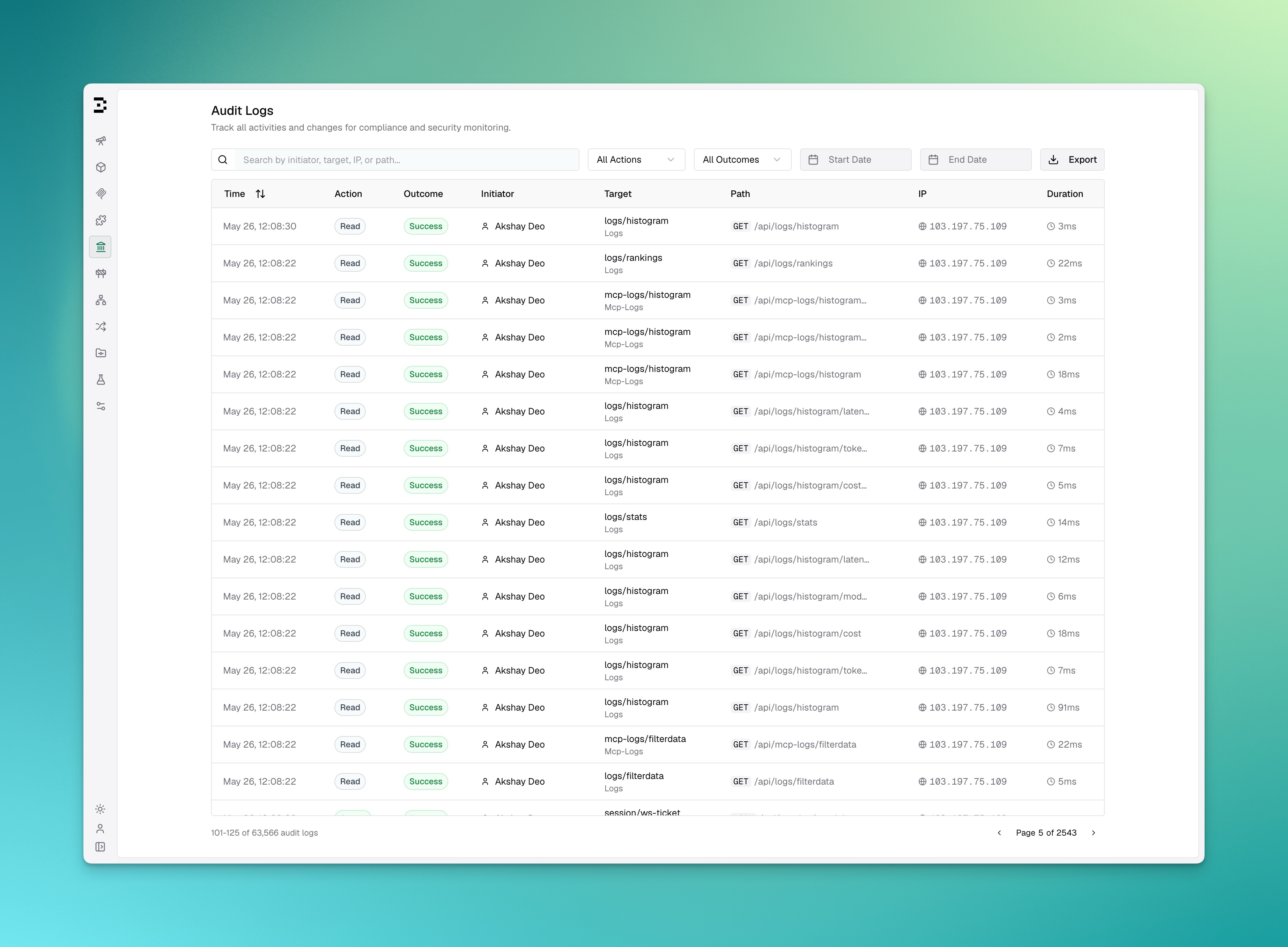
**Audit Logs** in Vikat Enterprise record administrative activity so operators can review who changed what, when it happened, and which resource was affected.
Audit log entries can be signed with an HMAC key, retained for a configurable number of days, viewed in the dashboard, and exported for downstream review.
 ### Key Features
| Feature | Description |
| -------------------- | --------------------------------------------------------------------------------------------- |
| **Signed events** | Configure an HMAC key so audit entries can be verified. |
| **Dashboard review** | View audit entries from the **Audit Logs** workspace page. |
| **Filtering** | Filter by search text, action, outcome, and date range. |
| **Export** | Export matching entries as JSON, JSON Lines, or Syslog when the user has download permission. |
| **Retention** | Configure how long audit log entries are kept. |
***
## Configuration
```json theme={null}
{
"audit_logs": {
"disabled": false,
"hmac_key": "env.AUDIT_HMAC_KEY",
"retention_days": 365
}
}
```
### Configuration Fields
| Field | Type | Description |
| ---------------- | ------- | ------------------------------------------------------------------------------------------------------------------------------------------ |
| `disabled` | boolean | When `true`, audit logging is turned off. Default: `false`. |
| `hmac_key` | string | HMAC secret key used to sign audit events. Minimum 32 bytes. Supports `env.` prefix for environment variables (e.g. `env.AUDIT_HMAC_KEY`). |
| `retention_days` | integer | Days to retain audit log entries. `0` disables retention-based cleanup. |
## Viewing Audit Logs
Open **Governance > Audit Logs** in the Vikat dashboard.
The table shows:
| Column | Description |
| ------------- | ---------------------------------------------------------------------------------------------------- |
| **Time** | When the event occurred. |
| **Action** | The operation performed, such as create, update, delete, authenticate, authorize, export, or import. |
| **Outcome** | The result of the operation: success, failure, or pending. |
| **Initiator** | The user, API key, or system actor that initiated the action. |
| **Target** | The resource affected by the action. |
| **Path** | The request method and path, when available. |
| **IP** | The request IP address, when available. |
| **Duration** | Request duration in milliseconds, when available. |
You can search by initiator, target, IP, or path, and filter by action, outcome, start date, and end date.
## Exporting Audit Logs
Users with `AuditLogs:Download` permission can export the currently filtered audit log results from the dashboard.
Supported export formats:
| Format | Use Case |
| ----------------- | ------------------------------------------------------------ |
| JSON | Structured review or ad hoc processing. |
| JSON Lines | Line-delimited ingestion pipelines. |
| Syslog (RFC 5424) | SIEM or log-forwarding pipelines that accept syslog records. |
## API Reference
For the exact request and response contract, see the [API Reference](/api-reference).
### Key Features
| Feature | Description |
| -------------------- | --------------------------------------------------------------------------------------------- |
| **Signed events** | Configure an HMAC key so audit entries can be verified. |
| **Dashboard review** | View audit entries from the **Audit Logs** workspace page. |
| **Filtering** | Filter by search text, action, outcome, and date range. |
| **Export** | Export matching entries as JSON, JSON Lines, or Syslog when the user has download permission. |
| **Retention** | Configure how long audit log entries are kept. |
***
## Configuration
```json theme={null}
{
"audit_logs": {
"disabled": false,
"hmac_key": "env.AUDIT_HMAC_KEY",
"retention_days": 365
}
}
```
### Configuration Fields
| Field | Type | Description |
| ---------------- | ------- | ------------------------------------------------------------------------------------------------------------------------------------------ |
| `disabled` | boolean | When `true`, audit logging is turned off. Default: `false`. |
| `hmac_key` | string | HMAC secret key used to sign audit events. Minimum 32 bytes. Supports `env.` prefix for environment variables (e.g. `env.AUDIT_HMAC_KEY`). |
| `retention_days` | integer | Days to retain audit log entries. `0` disables retention-based cleanup. |
## Viewing Audit Logs
Open **Governance > Audit Logs** in the Vikat dashboard.
The table shows:
| Column | Description |
| ------------- | ---------------------------------------------------------------------------------------------------- |
| **Time** | When the event occurred. |
| **Action** | The operation performed, such as create, update, delete, authenticate, authorize, export, or import. |
| **Outcome** | The result of the operation: success, failure, or pending. |
| **Initiator** | The user, API key, or system actor that initiated the action. |
| **Target** | The resource affected by the action. |
| **Path** | The request method and path, when available. |
| **IP** | The request IP address, when available. |
| **Duration** | Request duration in milliseconds, when available. |
You can search by initiator, target, IP, or path, and filter by action, outcome, start date, and end date.
## Exporting Audit Logs
Users with `AuditLogs:Download` permission can export the currently filtered audit log results from the dashboard.
Supported export formats:
| Format | Use Case |
| ----------------- | ------------------------------------------------------------ |
| JSON | Structured review or ad hoc processing. |
| JSON Lines | Line-delimited ingestion pipelines. |
| Syslog (RFC 5424) | SIEM or log-forwarding pipelines that accept syslog records. |
## API Reference
For the exact request and response contract, see the [API Reference](/api-reference).