> ## Documentation Index
> Fetch the complete documentation index at: https://docs.vikat.ai/llms.txt
> Use this file to discover all available pages before exploring further.
# Budget and Limits
> Enterprise-grade budget management and cost control with hierarchical budget allocation through virtual keys, teams, and customers.
## Overview
**Multiple replicas sharing one Postgres are supported, and limits hold fleet-wide.** This page previously said the opposite ("running multiple OSS Vikat nodes with a Postgres backend is not supported") while the two other documents on the subject said limits were enforced across the fleet. The disagreement has been settled by measurement rather than by argument.
Here is the short technical explanation:
* Vikat keeps hot state — provider configs, keys, budgets, usage — in memory. Each replica flushes its spend as a **delta into a shared Postgres counter** on a flush interval, and reads the fleet's total back in the same transaction, so every node enforces against what the whole fleet has spent as of its own last flush.
* Enforcement across replicas is therefore **convergent, not instantaneous**: a fleet can overshoot a limit by what it spends inside one flush window, and no more. State it that way to customers — *enforced fleet-wide within the flush interval*, never as a hard real-time cap.
* A single instance comfortably handles around 3,000–5,000 RPS, which is where most teams should start.
* There is no cross-node consensus layer in this repository. An earlier version of this page described a RAFT-based real-time sync; no such code ships here, and this page stops claiming it. `docs/enterprise/clustering.mdx` is the authoritative description of multi-replica behaviour.
**The fleet-wide part was broken until it was measured, and fixing it makes limits tighter.** The flush composed correctly — node A's spend and node B's spend added up in the shared row — but nothing read that row back, so each replica compared only its own spend against the limit. Two replicas admitted $200 against a $100 budget, and 200 requests against a limit of 100.
If you are upgrading a multi-replica deployment, a fleet of R replicas that was quietly allowing roughly R times every configured limit now allows the configured value. Your configuration did not change; its effect did. See the upgrade note in [Running multiple replicas](/enterprise/clustering).
Budgeting and rate limiting are a core feature of Vikat's governance system managed through [Virtual Keys](./virtual-keys).
Vikat's budget management system provides comprehensive cost control and financial governance for enterprise AI deployments. It operates through a **hierarchical budget structure** that enables granular cost management, usage tracking, and financial oversight across your entire organization.
**Core Hierarchy:**
```
Customer (has independent budget)
↓ (one-to-many)
Team (has independent budget)
↓ (one-to-many)
Virtual Key (has independent budget + rate limits)
↓ (one-to-many)
Provider Config (has independent budget + rate limits)
OR
Customer (has independent budget)
↓ (direct attachment)
Virtual Key (has independent budget + rate limits)
↓ (one-to-many)
Provider Config (has independent budget + rate limits)
OR
Virtual Key (standalone - has independent budget + rate limits)
↓ (one-to-many)
Provider Config (has independent budget + rate limits)
```
**Key Capabilities:**
* **Virtual Keys** - Primary access control via `x-vikat-vk` header (exclusive team OR customer attachment)
* **Budget Management** - Independent budget limits at each hierarchy level with cumulative checking
* **Rate Limiting** - Request and token-based throttling at both VK and provider config levels
* **Provider-Level Governance** - Granular budgets and rate limits per AI provider within a virtual key
* **Model/Provider Filtering** - Granular access control per virtual key
* **Usage Tracking** - Real-time monitoring and audit trails
* **Audit Headers** - Optional team and customer identification
***
## Budget Management
### Cost Calculation
Vikat automatically calculates costs based on:
* **Provider Pricing** - Real-time model pricing data
* **Token Usage** - Input + output tokens from API responses
* **Request Type** - Different pricing for chat, text, embedding, speech, transcription
* **Cache Status** - Reduced costs for cached responses
* **Batch Operations** - Volume discounts for batch requests
All cost calculation details are covered in [Architecture > Framework > Model Catalog](../../architecture/framework/model-catalog).
### Budget Checking Flow
When a request is made with a virtual key, Vikat checks **all applicable budgets independently** in the hierarchy. Each budget must have sufficient remaining balance for the request to proceed.
**Checking Sequence:**
**For VK → Team → Customer:**
```
1. ✓ Provider Config Budget (if provider config has budget)
2. ✓ VK Budget (if VK has budget)
3. ✓ Team Budget (if VK's team has budget)
4. ✓ Customer Budget (if team's customer has budget)
```
**For VK → Customer (direct):**
```
1. ✓ Provider Config Budget (if provider config has budget)
2. ✓ VK Budget (if VK has budget)
3. ✓ Customer Budget (if VK's customer has budget)
```
**For Standalone VK:**
```
1. ✓ Provider Config Budget (if provider config has budget)
2. ✓ VK Budget (if VK has budget)
```
**Important Notes:**
* **All applicable budgets must pass** - any single budget failure blocks the request
* **Budgets are independent** - each tracks its own usage and limits
* **Costs are deducted from all applicable budgets** - same cost applied to each level
* **Rate limits checked at provider config and VK levels** - teams and customers have no rate limits
* **Provider selection** - providers that exceed their budget or rate limits are excluded from [routing](./routing)
**Example:**
```
- Provider config budget: $4/$5 remaining ✓
- VK budget: $9/$10 remaining ✓
- Team budget: $15/$20 remaining ✓
- Customer budget: $45/$50 remaining ✓
- Result: Allowed (no budget is exceeded)
- After request:
- Request cost: $2
- Updated Provider=$6/$5, VK=$11/$10, Team=$17/$20, Customer=$47/$50
- Then the next request will be blocked (both provider and VK budgets exceeded).
```
## Rate Limiting
Rate limits protect your system from abuse and manage traffic by setting thresholds on request frequency and token usage over a specific time window. Rate limits can be configured at **both the Virtual Key level and Provider Config level** for granular control.
Vikat supports two types of rate limits that work in parallel:
* **Request Limits**: Control the maximum number of API calls that can be made within a set duration (e.g., 100 requests per minute).
* **Token Limits**: Control the maximum number of tokens (prompt + completion) that can be processed within a set duration (e.g., 50,000 tokens per hour).
### Rate Limit Hierarchy
Rate limits are checked in hierarchical order:
```
1. ✓ Provider Config Rate Limits (if provider config has rate limits)
2. ✓ Virtual Key Rate Limits (if VK has rate limits)
```
For a request to be allowed, it must pass both the request limit and token limit checks at **all applicable levels**. If a provider config exceeds its rate limits, that provider is excluded from routing, but other providers within the same virtual key remain available.
### Provider-Level Rate Limiting
Provider configs within a virtual key can have independent rate limits, enabling:
* **Per-Provider Throttling**: Different rate limits for OpenAI vs Anthropic
* **Provider Isolation**: Rate limit violations on one provider don't affect others
* **Granular Control**: Fine-tune limits based on provider capabilities and costs
## Reset Durations
Budgets and rate limits support flexible reset durations:
**Format Examples:**
* `1m` - 1 minute
* `5m` - 5 minutes
* `1h` - 1 hour
* `1d` - 1 day
* `1w` - 1 week
* `1M` - 1 month
* `1Y` - 1 year
**Common Patterns:**
* **Rate Limits**: `1m`, `1h`, `1d` for request throttling
* **Budgets**: `1d`, `1w`, `1M`, `1Y` for cost control
### Calendar-aligned budgets
By default, a budget **rolls**: after `reset_duration` elapses since `last_reset`, usage resets. With **`calendar_aligned`: `true`**, the budget resets at the **start of each calendar period in UTC** instead (same instant for every customer of that configuration).
**Supported `reset_duration` suffixes:** only day (`d`), week (`w`), month (`M`), and year (`Y`). Examples: `1d` → midnight UTC each day; `1w` → Monday 00:00 UTC each week; `1M` → first day of each month; `1Y` → January 1 each year. Sub-day durations (for example `1h`, `30m`) **cannot** use calendar alignment; the API rejects invalid combinations.
Calendar alignment applies to budgets on **customers**, **teams**, **virtual keys**, and **per–provider-config** budgets. You can set it when creating a budget (`calendar_aligned` on create) or toggle it on update (`calendar_aligned` on the budget in `PUT` requests). Turning calendar alignment **on** for an existing budget resets **current usage to zero** and snaps **`last_reset`** to the current period start.
***
## Customer-scoped requests
Customer scoping is a **Vikat Enterprise** feature. It applies to requests made with a **team-attached virtual key** when that team is linked to more than one customer.
In Enterprise deployments a team can be attached to multiple customers. By default, a request through a team's virtual key charges and enforces **every** customer the team belongs to. To attribute a single request to **one** specific customer, send a customer-scope header:
| Header | Description |
| ----------------------- | ------------------------------------------------------ |
| `x-vikat-customer-id` | The customer's ID. |
| `x-vikat-customer-name` | The customer's display name (must be globally unique). |
When a scope header is present, only the named customer is charged, rate-limited, and recorded in that request's usage logs — the team's other customers are left untouched. The team's own budget, the virtual key budget, and provider-config limits are always enforced regardless of scope.
**Resolution rules:**
* `x-vikat-customer-id` takes precedence over `x-vikat-customer-name` when both are sent.
* Surrounding whitespace is trimmed, and the header name is **case-insensitive** (like all Vikat headers).
* Send no customer-scope header to charge and enforce all of the team's customers (the default).
### Examples
Scope a chat request to a customer by ID:
```bash theme={null}
curl http://localhost:8080/v1/chat/completions \
-H "Content-Type: application/json" \
-H "x-vikat-vk: " \
-H "x-vikat-customer-id: cust_acme" \
-d '{"model": "gpt-4o", "messages": [{"role": "user", "content": "Hello"}]}'
```
Or scope by name instead:
```bash theme={null}
curl http://localhost:8080/v1/chat/completions \
-H "Content-Type: application/json" \
-H "x-vikat-vk: " \
-H "x-vikat-customer-name: Acme Corp" \
-d '{"model": "gpt-4o", "messages": [{"role": "user", "content": "Hello"}]}'
```
### Validation
The customer scope is validated **before** the request reaches a provider, and it **fails closed**: an invalid scope is rejected even when budget and rate-limit enforcement is otherwise skipped. A request is rejected with **400 Bad Request** when the scope header is:
* present but empty or whitespace-only,
* an ID or name that does not match any customer, or
* a customer that exists but is **not** attached to the virtual key's team.
**Example error response:**
```json theme={null}
{
"error": {
"message": "customer \"Acme Corp\" is not attached to this team"
}
}
```
***
## Configuration Guide
Configure provider-level budgets and rate limits using any of these methods:
The Vikat Web UI provides an intuitive interface for configuring provider-level governance through the Virtual Keys management page.
### Creating Virtual Keys with Provider Configs
1. **Navigate to Virtual Keys**: Go to **Virtual Keys** page in the Vikat dashboard
2. **Create New Virtual Key**: Click "Create Virtual Key" button
3. **Configure Providers**: In the "Provider Configurations" section:
* Add multiple providers with individual weights
* Set provider-specific budgets and rate limits
* Configure allowed models per provider
### Provider Configuration Interface
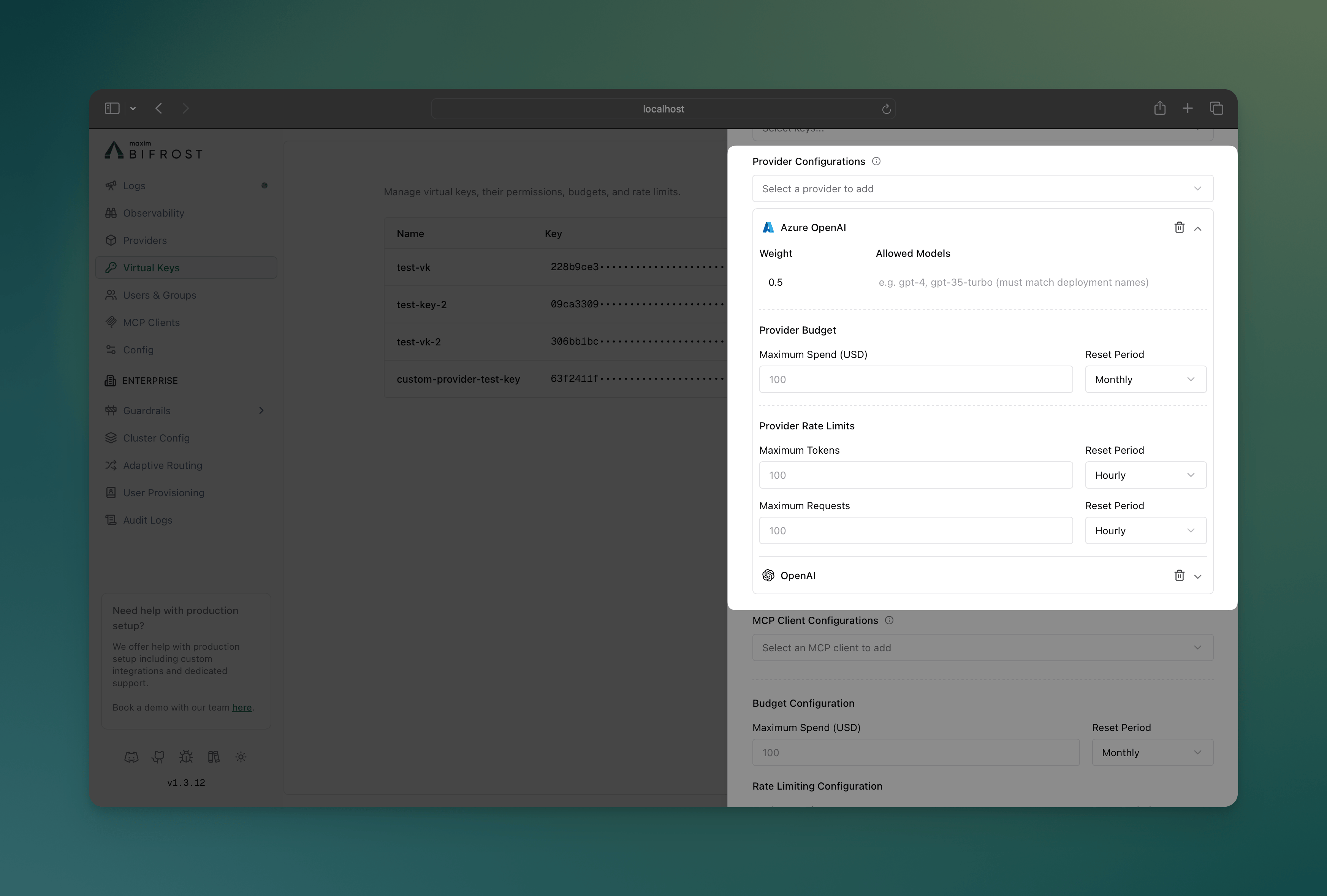 **Key Features:**
* **Visual Provider Cards**: Each provider displays as an expandable card
* **Budget Controls**: Set spending limits with reset periods per provider
* **Rate Limit Controls**: Configure token and request limits independently
* **Model Filtering**: Specify allowed models for each provider
* **Weight Distribution**: Visual indicators for load balancing weights
* **Real-time Validation**: Immediate feedback on configuration errors
### Monitoring Provider Usage
**Key Features:**
* **Visual Provider Cards**: Each provider displays as an expandable card
* **Budget Controls**: Set spending limits with reset periods per provider
* **Rate Limit Controls**: Configure token and request limits independently
* **Model Filtering**: Specify allowed models for each provider
* **Weight Distribution**: Visual indicators for load balancing weights
* **Real-time Validation**: Immediate feedback on configuration errors
### Monitoring Provider Usage
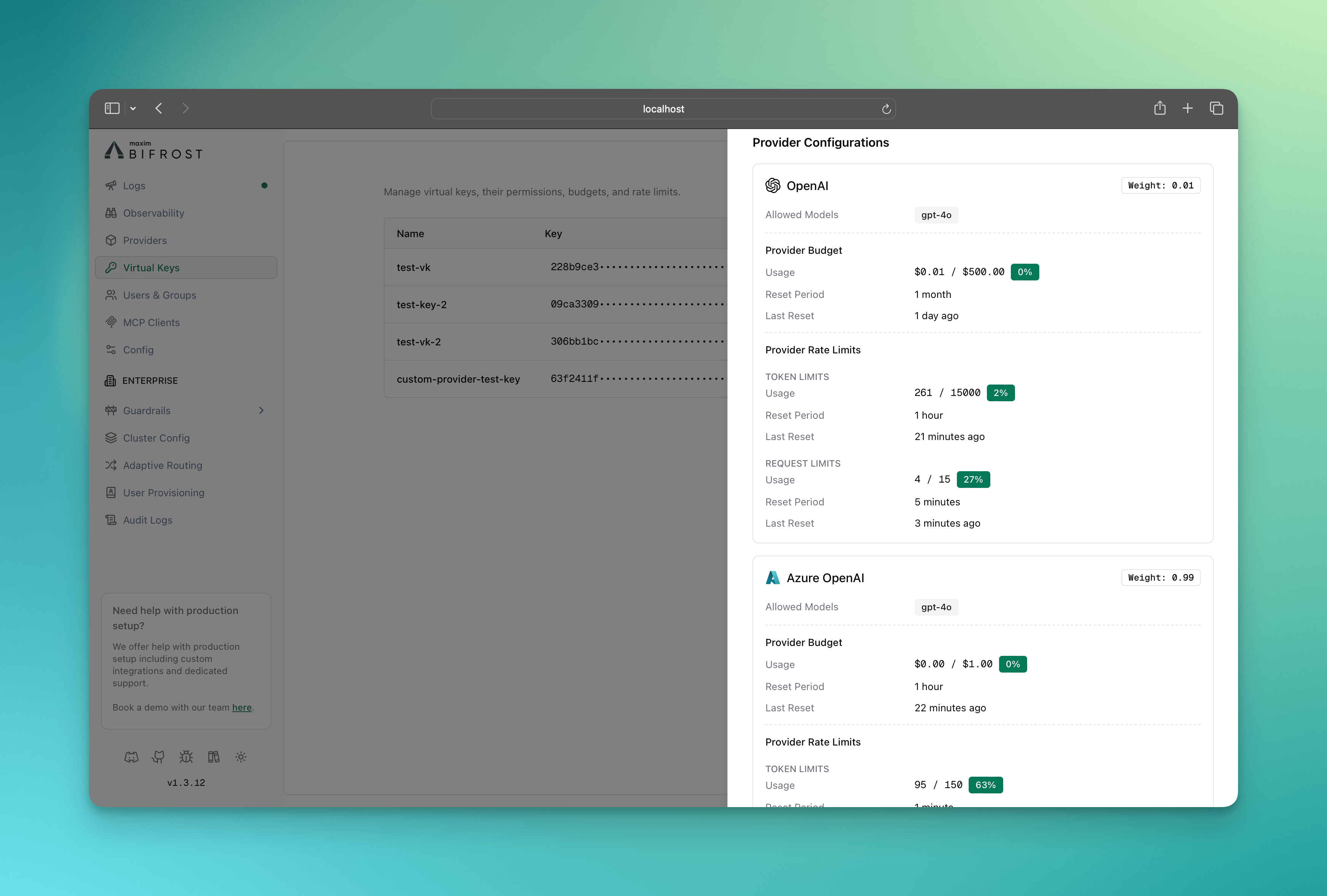 The info sheet for the virtual key provides real-time monitoring of:
* Budget consumption per provider
* Rate limit utilization (tokens and requests)
* Provider availability status
* Usage trends and forecasting
Use the Vikat HTTP API to programmatically manage provider-level governance configurations.
### Create Virtual Key with Provider Configs
```bash theme={null}
curl -X POST "https://your-vikat-instance.com/api/governance/virtual-keys" \
-H "Content-Type: application/json" \
-d '{
"name": "marketing-team-vk",
"description": "Marketing team virtual key with provider-specific limits",
"provider_configs": [
{
"provider": "openai",
"weight": 0.7,
"allowed_models": ["gpt-4", "gpt-3.5-turbo"],
"budget": {
"max_limit": 500.00,
"reset_duration": "1M",
"calendar_aligned": true
},
"rate_limit": {
"token_max_limit": 1000000,
"token_reset_duration": "1h",
"request_max_limit": 1000,
"request_reset_duration": "1h"
}
},
{
"provider": "anthropic",
"weight": 0.3,
"allowed_models": ["claude-3-opus", "claude-3-sonnet"],
"budget": {
"max_limit": 200.00,
"reset_duration": "1M"
},
"rate_limit": {
"token_max_limit": 500000,
"token_reset_duration": "1h",
"request_max_limit": 500,
"request_reset_duration": "1h"
}
}
],
"budget": {
"max_limit": 1000.00,
"reset_duration": "1M",
"calendar_aligned": true
},
"is_active": true
}'
```
Use `calendar_aligned` only with `d` / `w` / `M` / `Y` reset durations (see [Calendar-aligned budgets](#calendar-aligned-budgets)).
### Update Provider Configuration
```bash theme={null}
curl -X PUT "https://your-vikat-instance.com/api/governance/virtual-keys/{vk_id}" \
-H "Content-Type: application/json" \
-d '{
"provider_configs": [
{
"id": 1,
"provider": "openai",
"weight": 0.8,
"budget": {
"max_limit": 600.00,
"reset_duration": "1M"
},
"rate_limit": {
"token_max_limit": 1200000,
"token_reset_duration": "1h"
}
}
]
}'
```
### API Response Structure
```json theme={null}
{
"message": "Virtual key created successfully",
"virtual_key": {
"id": "vk_123",
"name": "marketing-team-vk",
"value": "vk_abc123def456",
"provider_configs": [
{
"id": 1,
"provider": "openai",
"weight": 0.7,
"allowed_models": ["gpt-4", "gpt-3.5-turbo"],
"budget": {
"id": "budget_789",
"max_limit": 500.00,
"current_usage": 0.00,
"reset_duration": "1M",
"calendar_aligned": true,
"last_reset": "2024-01-01T00:00:00Z"
},
"rate_limit": {
"id": "rate_limit_456",
"token_max_limit": 1000000,
"token_current_usage": 0,
"token_reset_duration": "1h",
"token_last_reset": "2024-01-01T00:00:00Z",
"request_max_limit": 1000,
"request_current_usage": 0,
"request_reset_duration": "1h",
"request_last_reset": "2024-01-01T00:00:00Z"
}
}
]
}
}
```
### Field Descriptions
| Field | Type | Description |
| ------------------------------ | ------- | ------------------------------------------------------------------------------------ |
| `provider` | string | AI provider name (e.g., "openai", "anthropic") |
| `weight` | float | Load balancing weight (0.0-1.0) |
| `allowed_models` | array | Specific models allowed for this provider |
| `budget.max_limit` | float | Maximum spend in USD |
| `budget.reset_duration` | string | Reset period (e.g., "1h", "1d", "1M") |
| `budget.calendar_aligned` | boolean | When true, resets at calendar boundaries in UTC (requires `d`/`w`/`M`/`Y` durations) |
| `rate_limit.token_max_limit` | integer | Maximum tokens per period |
| `rate_limit.request_max_limit` | integer | Maximum requests per period |
Configure provider-level governance through Vikat's configuration file for declarative management.
### Basic Configuration Structure
```json theme={null}
{
"governance": {
"virtual_keys": [
{
"id": "vk-dev-001",
"name": "development-team-vk",
"description": "Development team with multi-provider setup",
"is_active": true,
"rate_limit_id": "rl-vk-dev",
"provider_configs": [
{
"id": 1,
"provider": "openai",
"weight": 0.6,
"allowed_models": ["gpt-4", "gpt-3.5-turbo"],
"rate_limit_id": "rl-pc-openai"
},
{
"id": 2,
"provider": "anthropic",
"weight": 0.4,
"allowed_models": ["claude-3-opus", "claude-3-sonnet"],
"rate_limit_id": "rl-pc-anthropic"
}
]
}
],
"budgets": [
{
"id": "budget-vk-dev",
"virtual_key_id": "vk-dev-001",
"max_limit": 2000.00,
"reset_duration": "1M",
"calendar_aligned": true
},
{
"id": "budget-pc-openai",
"provider_config_id": 1,
"max_limit": 1000.00,
"reset_duration": "1M"
},
{
"id": "budget-pc-anthropic",
"provider_config_id": 2,
"max_limit": 500.00,
"reset_duration": "1M"
}
],
"rate_limits": [
{
"id": "rl-vk-dev",
"token_max_limit": 5000000,
"token_reset_duration": "1h",
"request_max_limit": 3000,
"request_reset_duration": "1h"
},
{
"id": "rl-pc-openai",
"token_max_limit": 2000000,
"token_reset_duration": "1h",
"request_max_limit": 2000,
"request_reset_duration": "1h"
},
{
"id": "rl-pc-anthropic",
"token_max_limit": 1000000,
"token_reset_duration": "1h",
"request_max_limit": 1000,
"request_reset_duration": "1h"
}
]
}
}
```
Budgets and rate limits live as **separate top-level arrays** inside `governance`. Virtual keys and provider configs reference them by id (`rate_limit_id`) or are referenced back (`virtual_key_id` / `provider_config_id` on each `budgets[]` entry). Optional `calendar_aligned` on each `budget` matches the HTTP API and [calendar-aligned behavior](#calendar-aligned-budgets).
### Advanced Configuration Examples
#### Cost-Optimized Setup
```json theme={null}
{
"governance": {
"virtual_keys": [
{
"id": "vk-cost-opt",
"name": "cost-optimized-vk",
"provider_configs": [
{"id": 10, "provider": "openai-gpt-3.5", "weight": 0.8, "rate_limit_id": "rl-cheap"},
{"id": 11, "provider": "openai-gpt-4", "weight": 0.2, "rate_limit_id": "rl-premium"}
]
}
],
"budgets": [
{"id": "b-cheap", "provider_config_id": 10, "max_limit": 50.00, "reset_duration": "1d"},
{"id": "b-premium", "provider_config_id": 11, "max_limit": 200.00, "reset_duration": "1d"}
],
"rate_limits": [
{"id": "rl-cheap", "request_max_limit": 1000, "request_reset_duration": "1h"},
{"id": "rl-premium", "request_max_limit": 100, "request_reset_duration": "1h"}
]
}
}
```
#### High-Volume Production Setup
```json theme={null}
{
"governance": {
"virtual_keys": [
{
"id": "vk-prod-hv",
"name": "production-high-volume-vk",
"provider_configs": [
{"id": 20, "provider": "openai", "weight": 0.5, "rate_limit_id": "rl-openai"},
{"id": 21, "provider": "anthropic", "weight": 0.3, "rate_limit_id": "rl-anthropic"},
{"id": 22, "provider": "azure-openai", "weight": 0.2, "rate_limit_id": "rl-azure"}
]
}
],
"budgets": [
{"id": "b-openai", "provider_config_id": 20, "max_limit": 5000.00, "reset_duration": "1M"},
{"id": "b-anthropic", "provider_config_id": 21, "max_limit": 3000.00, "reset_duration": "1M"},
{"id": "b-azure", "provider_config_id": 22, "max_limit": 2000.00, "reset_duration": "1M"}
],
"rate_limits": [
{"id": "rl-openai", "token_max_limit": 10000000, "token_reset_duration": "1h", "request_max_limit": 10000, "request_reset_duration": "1h"},
{"id": "rl-anthropic", "token_max_limit": 6000000, "token_reset_duration": "1h", "request_max_limit": 6000, "request_reset_duration": "1h"},
{"id": "rl-azure", "token_max_limit": 4000000, "token_reset_duration": "1h", "request_max_limit": 4000, "request_reset_duration": "1h"}
]
}
}
```
**Validation Rules:**
* Budget limits must be positive numbers
* Reset durations must be valid time formats
* Rate limits must be positive integers
* Provider names must match configured providers
## Provider-Level Governance Examples
### Example 1: Mixed Provider Budgets
A virtual key configured with multiple providers and different budget allocations:
```json theme={null}
{
"governance": {
"virtual_keys": [
{
"id": "vk-mkt",
"name": "marketing-team-vk",
"provider_configs": [
{"id": 30, "provider": "openai", "weight": 0.7},
{"id": 31, "provider": "anthropic", "weight": 0.3}
]
}
],
"budgets": [
{"id": "b-vk-mkt", "virtual_key_id": "vk-mkt", "max_limit": 100, "reset_duration": "1M"},
{"id": "b-openai", "provider_config_id": 30, "max_limit": 50, "reset_duration": "1M"},
{"id": "b-anth", "provider_config_id": 31, "max_limit": 30, "reset_duration": "1M"}
]
}
}
```
**Behavior:**
* OpenAI requests limited to 50 dollars/month at provider level + 100 dollars/month at VK level
* Anthropic requests limited to 30 dollars/month at provider level + 100 dollars/month at VK level
* If any provider's budget is exhausted, all requests to that provider will be blocked
### Example 2: Provider-Specific Rate Limits
Different rate limits based on provider capabilities:
```json theme={null}
{
"governance": {
"virtual_keys": [
{
"id": "vk-hv",
"name": "high-volume-vk",
"provider_configs": [
{"id": 40, "provider": "openai", "rate_limit_id": "rl-openai"},
{"id": 41, "provider": "anthropic", "rate_limit_id": "rl-anthropic"}
]
}
],
"rate_limits": [
{"id": "rl-openai", "request_max_limit": 1000, "request_reset_duration": "1h", "token_max_limit": 1000000, "token_reset_duration": "1h"},
{"id": "rl-anthropic", "request_max_limit": 500, "request_reset_duration": "1h", "token_max_limit": 500000, "token_reset_duration": "1h"}
]
}
}
```
**Behavior:**
* OpenAI: 1000 requests/hour, 1M tokens/hour
* Anthropic: 500 requests/hour, 500K tokens/hour
* If any provider's rate limits are exceeded, all requests to that provider will be blocked
### Example 3: Failover Strategy
Provider configurations with budget-based failover:
```json theme={null}
{
"governance": {
"virtual_keys": [
{
"id": "vk-cost",
"name": "cost-optimized-vk",
"provider_configs": [
{"id": 50, "provider": "openai-cheap", "weight": 1.0},
{"id": 51, "provider": "openai-premium", "weight": 0.0, "rate_limit_id": "rl-premium"}
]
}
],
"budgets": [
{"id": "b-cheap", "provider_config_id": 50, "max_limit": 10, "reset_duration": "1d"},
{"id": "b-premium", "provider_config_id": 51, "max_limit": 50, "reset_duration": "1d"}
],
"rate_limits": [
{"id": "rl-premium", "request_max_limit": 100, "request_reset_duration": "1h", "token_max_limit": 50000, "token_reset_duration": "1h"}
]
}
}
```
**Behavior:**
* Primary: Use cheap provider until \$10 daily budget exhausted
* Fallback: Automatically switch to premium provider when cheap option unavailable. To enable this, you should not send `provider` name in the request body, read [Routing](./routing#automatic-fallbacks) for more details.
* Cost containment: Prevent unexpected overspend on premium resources and limit the number of requests to the premium provider
## Key Benefits of Provider-Level Governance
* **Granular Control**: Set specific spending limits and rate limits per AI provider
* **Automatic Fallback**: Route to alternative providers when budgets or rate limits are exceeded
* **Cost Control**: Track and control spending by provider for better financial oversight
* **Performance Testing**: A/B testing across providers with controlled budgets
* **Multi-Provider Strategies**: Primary/backup provider configurations
* **Cost-Tiered Access**: Cheap providers for basic tasks, premium for complex workloads
***
## Next Steps
* **[Routing](./routing)** - Direct requests to specific AI models, providers, and keys using Virtual Keys.
* **[MCP Tool Filtering](./mcp-tools)** - Manage MCP clients/tools for virtual keys.
* **[Tracing](../observability/default)** - Audit trails and request tracking
The info sheet for the virtual key provides real-time monitoring of:
* Budget consumption per provider
* Rate limit utilization (tokens and requests)
* Provider availability status
* Usage trends and forecasting
Use the Vikat HTTP API to programmatically manage provider-level governance configurations.
### Create Virtual Key with Provider Configs
```bash theme={null}
curl -X POST "https://your-vikat-instance.com/api/governance/virtual-keys" \
-H "Content-Type: application/json" \
-d '{
"name": "marketing-team-vk",
"description": "Marketing team virtual key with provider-specific limits",
"provider_configs": [
{
"provider": "openai",
"weight": 0.7,
"allowed_models": ["gpt-4", "gpt-3.5-turbo"],
"budget": {
"max_limit": 500.00,
"reset_duration": "1M",
"calendar_aligned": true
},
"rate_limit": {
"token_max_limit": 1000000,
"token_reset_duration": "1h",
"request_max_limit": 1000,
"request_reset_duration": "1h"
}
},
{
"provider": "anthropic",
"weight": 0.3,
"allowed_models": ["claude-3-opus", "claude-3-sonnet"],
"budget": {
"max_limit": 200.00,
"reset_duration": "1M"
},
"rate_limit": {
"token_max_limit": 500000,
"token_reset_duration": "1h",
"request_max_limit": 500,
"request_reset_duration": "1h"
}
}
],
"budget": {
"max_limit": 1000.00,
"reset_duration": "1M",
"calendar_aligned": true
},
"is_active": true
}'
```
Use `calendar_aligned` only with `d` / `w` / `M` / `Y` reset durations (see [Calendar-aligned budgets](#calendar-aligned-budgets)).
### Update Provider Configuration
```bash theme={null}
curl -X PUT "https://your-vikat-instance.com/api/governance/virtual-keys/{vk_id}" \
-H "Content-Type: application/json" \
-d '{
"provider_configs": [
{
"id": 1,
"provider": "openai",
"weight": 0.8,
"budget": {
"max_limit": 600.00,
"reset_duration": "1M"
},
"rate_limit": {
"token_max_limit": 1200000,
"token_reset_duration": "1h"
}
}
]
}'
```
### API Response Structure
```json theme={null}
{
"message": "Virtual key created successfully",
"virtual_key": {
"id": "vk_123",
"name": "marketing-team-vk",
"value": "vk_abc123def456",
"provider_configs": [
{
"id": 1,
"provider": "openai",
"weight": 0.7,
"allowed_models": ["gpt-4", "gpt-3.5-turbo"],
"budget": {
"id": "budget_789",
"max_limit": 500.00,
"current_usage": 0.00,
"reset_duration": "1M",
"calendar_aligned": true,
"last_reset": "2024-01-01T00:00:00Z"
},
"rate_limit": {
"id": "rate_limit_456",
"token_max_limit": 1000000,
"token_current_usage": 0,
"token_reset_duration": "1h",
"token_last_reset": "2024-01-01T00:00:00Z",
"request_max_limit": 1000,
"request_current_usage": 0,
"request_reset_duration": "1h",
"request_last_reset": "2024-01-01T00:00:00Z"
}
}
]
}
}
```
### Field Descriptions
| Field | Type | Description |
| ------------------------------ | ------- | ------------------------------------------------------------------------------------ |
| `provider` | string | AI provider name (e.g., "openai", "anthropic") |
| `weight` | float | Load balancing weight (0.0-1.0) |
| `allowed_models` | array | Specific models allowed for this provider |
| `budget.max_limit` | float | Maximum spend in USD |
| `budget.reset_duration` | string | Reset period (e.g., "1h", "1d", "1M") |
| `budget.calendar_aligned` | boolean | When true, resets at calendar boundaries in UTC (requires `d`/`w`/`M`/`Y` durations) |
| `rate_limit.token_max_limit` | integer | Maximum tokens per period |
| `rate_limit.request_max_limit` | integer | Maximum requests per period |
Configure provider-level governance through Vikat's configuration file for declarative management.
### Basic Configuration Structure
```json theme={null}
{
"governance": {
"virtual_keys": [
{
"id": "vk-dev-001",
"name": "development-team-vk",
"description": "Development team with multi-provider setup",
"is_active": true,
"rate_limit_id": "rl-vk-dev",
"provider_configs": [
{
"id": 1,
"provider": "openai",
"weight": 0.6,
"allowed_models": ["gpt-4", "gpt-3.5-turbo"],
"rate_limit_id": "rl-pc-openai"
},
{
"id": 2,
"provider": "anthropic",
"weight": 0.4,
"allowed_models": ["claude-3-opus", "claude-3-sonnet"],
"rate_limit_id": "rl-pc-anthropic"
}
]
}
],
"budgets": [
{
"id": "budget-vk-dev",
"virtual_key_id": "vk-dev-001",
"max_limit": 2000.00,
"reset_duration": "1M",
"calendar_aligned": true
},
{
"id": "budget-pc-openai",
"provider_config_id": 1,
"max_limit": 1000.00,
"reset_duration": "1M"
},
{
"id": "budget-pc-anthropic",
"provider_config_id": 2,
"max_limit": 500.00,
"reset_duration": "1M"
}
],
"rate_limits": [
{
"id": "rl-vk-dev",
"token_max_limit": 5000000,
"token_reset_duration": "1h",
"request_max_limit": 3000,
"request_reset_duration": "1h"
},
{
"id": "rl-pc-openai",
"token_max_limit": 2000000,
"token_reset_duration": "1h",
"request_max_limit": 2000,
"request_reset_duration": "1h"
},
{
"id": "rl-pc-anthropic",
"token_max_limit": 1000000,
"token_reset_duration": "1h",
"request_max_limit": 1000,
"request_reset_duration": "1h"
}
]
}
}
```
Budgets and rate limits live as **separate top-level arrays** inside `governance`. Virtual keys and provider configs reference them by id (`rate_limit_id`) or are referenced back (`virtual_key_id` / `provider_config_id` on each `budgets[]` entry). Optional `calendar_aligned` on each `budget` matches the HTTP API and [calendar-aligned behavior](#calendar-aligned-budgets).
### Advanced Configuration Examples
#### Cost-Optimized Setup
```json theme={null}
{
"governance": {
"virtual_keys": [
{
"id": "vk-cost-opt",
"name": "cost-optimized-vk",
"provider_configs": [
{"id": 10, "provider": "openai-gpt-3.5", "weight": 0.8, "rate_limit_id": "rl-cheap"},
{"id": 11, "provider": "openai-gpt-4", "weight": 0.2, "rate_limit_id": "rl-premium"}
]
}
],
"budgets": [
{"id": "b-cheap", "provider_config_id": 10, "max_limit": 50.00, "reset_duration": "1d"},
{"id": "b-premium", "provider_config_id": 11, "max_limit": 200.00, "reset_duration": "1d"}
],
"rate_limits": [
{"id": "rl-cheap", "request_max_limit": 1000, "request_reset_duration": "1h"},
{"id": "rl-premium", "request_max_limit": 100, "request_reset_duration": "1h"}
]
}
}
```
#### High-Volume Production Setup
```json theme={null}
{
"governance": {
"virtual_keys": [
{
"id": "vk-prod-hv",
"name": "production-high-volume-vk",
"provider_configs": [
{"id": 20, "provider": "openai", "weight": 0.5, "rate_limit_id": "rl-openai"},
{"id": 21, "provider": "anthropic", "weight": 0.3, "rate_limit_id": "rl-anthropic"},
{"id": 22, "provider": "azure-openai", "weight": 0.2, "rate_limit_id": "rl-azure"}
]
}
],
"budgets": [
{"id": "b-openai", "provider_config_id": 20, "max_limit": 5000.00, "reset_duration": "1M"},
{"id": "b-anthropic", "provider_config_id": 21, "max_limit": 3000.00, "reset_duration": "1M"},
{"id": "b-azure", "provider_config_id": 22, "max_limit": 2000.00, "reset_duration": "1M"}
],
"rate_limits": [
{"id": "rl-openai", "token_max_limit": 10000000, "token_reset_duration": "1h", "request_max_limit": 10000, "request_reset_duration": "1h"},
{"id": "rl-anthropic", "token_max_limit": 6000000, "token_reset_duration": "1h", "request_max_limit": 6000, "request_reset_duration": "1h"},
{"id": "rl-azure", "token_max_limit": 4000000, "token_reset_duration": "1h", "request_max_limit": 4000, "request_reset_duration": "1h"}
]
}
}
```
**Validation Rules:**
* Budget limits must be positive numbers
* Reset durations must be valid time formats
* Rate limits must be positive integers
* Provider names must match configured providers
## Provider-Level Governance Examples
### Example 1: Mixed Provider Budgets
A virtual key configured with multiple providers and different budget allocations:
```json theme={null}
{
"governance": {
"virtual_keys": [
{
"id": "vk-mkt",
"name": "marketing-team-vk",
"provider_configs": [
{"id": 30, "provider": "openai", "weight": 0.7},
{"id": 31, "provider": "anthropic", "weight": 0.3}
]
}
],
"budgets": [
{"id": "b-vk-mkt", "virtual_key_id": "vk-mkt", "max_limit": 100, "reset_duration": "1M"},
{"id": "b-openai", "provider_config_id": 30, "max_limit": 50, "reset_duration": "1M"},
{"id": "b-anth", "provider_config_id": 31, "max_limit": 30, "reset_duration": "1M"}
]
}
}
```
**Behavior:**
* OpenAI requests limited to 50 dollars/month at provider level + 100 dollars/month at VK level
* Anthropic requests limited to 30 dollars/month at provider level + 100 dollars/month at VK level
* If any provider's budget is exhausted, all requests to that provider will be blocked
### Example 2: Provider-Specific Rate Limits
Different rate limits based on provider capabilities:
```json theme={null}
{
"governance": {
"virtual_keys": [
{
"id": "vk-hv",
"name": "high-volume-vk",
"provider_configs": [
{"id": 40, "provider": "openai", "rate_limit_id": "rl-openai"},
{"id": 41, "provider": "anthropic", "rate_limit_id": "rl-anthropic"}
]
}
],
"rate_limits": [
{"id": "rl-openai", "request_max_limit": 1000, "request_reset_duration": "1h", "token_max_limit": 1000000, "token_reset_duration": "1h"},
{"id": "rl-anthropic", "request_max_limit": 500, "request_reset_duration": "1h", "token_max_limit": 500000, "token_reset_duration": "1h"}
]
}
}
```
**Behavior:**
* OpenAI: 1000 requests/hour, 1M tokens/hour
* Anthropic: 500 requests/hour, 500K tokens/hour
* If any provider's rate limits are exceeded, all requests to that provider will be blocked
### Example 3: Failover Strategy
Provider configurations with budget-based failover:
```json theme={null}
{
"governance": {
"virtual_keys": [
{
"id": "vk-cost",
"name": "cost-optimized-vk",
"provider_configs": [
{"id": 50, "provider": "openai-cheap", "weight": 1.0},
{"id": 51, "provider": "openai-premium", "weight": 0.0, "rate_limit_id": "rl-premium"}
]
}
],
"budgets": [
{"id": "b-cheap", "provider_config_id": 50, "max_limit": 10, "reset_duration": "1d"},
{"id": "b-premium", "provider_config_id": 51, "max_limit": 50, "reset_duration": "1d"}
],
"rate_limits": [
{"id": "rl-premium", "request_max_limit": 100, "request_reset_duration": "1h", "token_max_limit": 50000, "token_reset_duration": "1h"}
]
}
}
```
**Behavior:**
* Primary: Use cheap provider until \$10 daily budget exhausted
* Fallback: Automatically switch to premium provider when cheap option unavailable. To enable this, you should not send `provider` name in the request body, read [Routing](./routing#automatic-fallbacks) for more details.
* Cost containment: Prevent unexpected overspend on premium resources and limit the number of requests to the premium provider
## Key Benefits of Provider-Level Governance
* **Granular Control**: Set specific spending limits and rate limits per AI provider
* **Automatic Fallback**: Route to alternative providers when budgets or rate limits are exceeded
* **Cost Control**: Track and control spending by provider for better financial oversight
* **Performance Testing**: A/B testing across providers with controlled budgets
* **Multi-Provider Strategies**: Primary/backup provider configurations
* **Cost-Tiered Access**: Cheap providers for basic tasks, premium for complex workloads
***
## Next Steps
* **[Routing](./routing)** - Direct requests to specific AI models, providers, and keys using Virtual Keys.
* **[MCP Tool Filtering](./mcp-tools)** - Manage MCP clients/tools for virtual keys.
* **[Tracing](../observability/default)** - Audit trails and request tracking