

Overview
OpenAI is the baseline schema for Vikat. When using OpenAI directly, parameters are passed through with minimal conversion - mostly validation and filtering of OpenAI-specific features.Supported Operations
Setup & Configuration
Configure OpenAI as a provider.- Web UI
- config.json
- API
- Go SDK
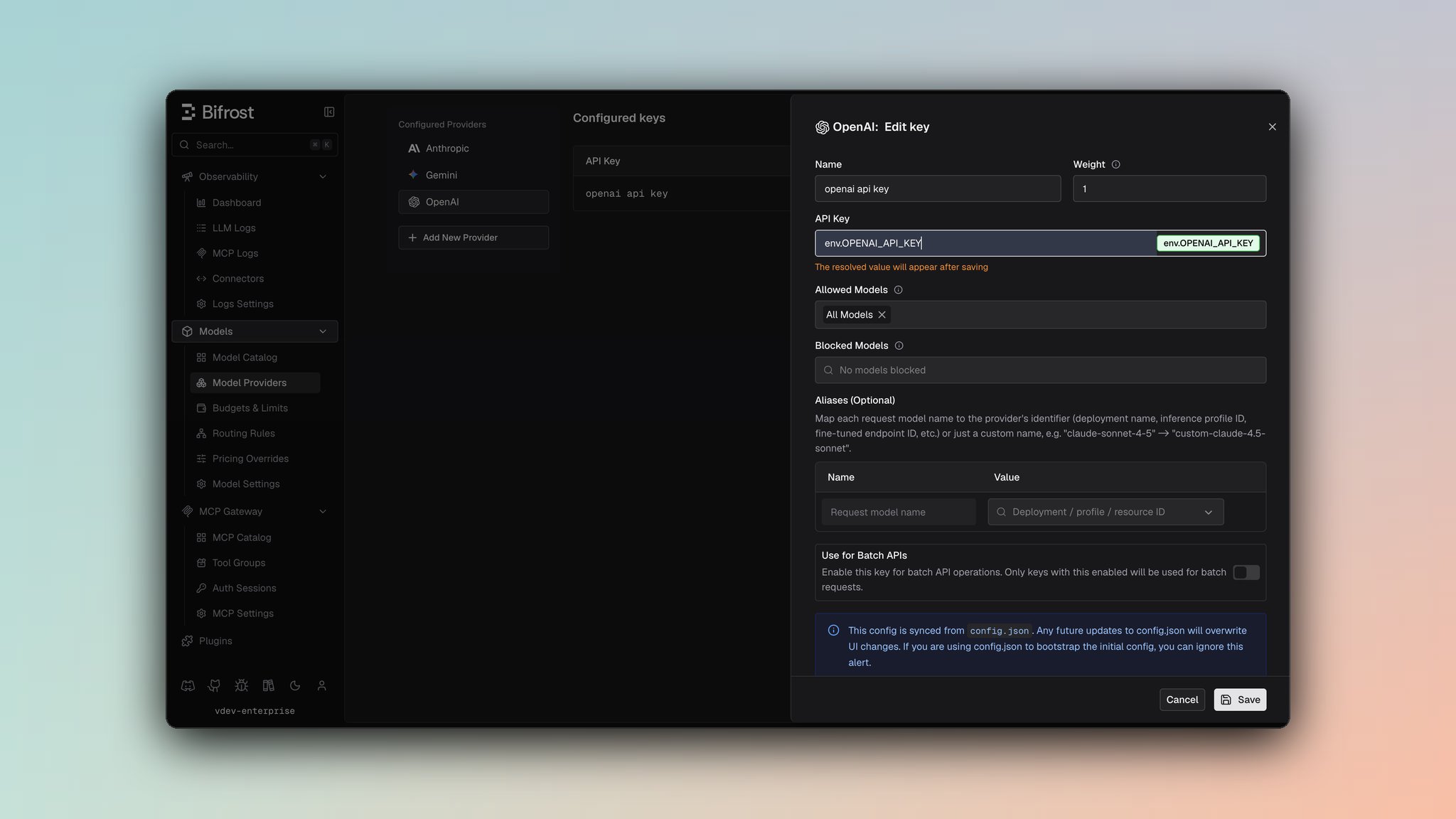
- Navigate to Models > Model Providers. Look for OpenAI under Configured Providers. If it is missing, click on Add New Provider and select OpenAI.
- Click Add Key or edit an existing key.
- Set a name for your key.
- Paste your API key directly or use an environment variable (for example,
env.OPENAI_API_KEY). - Set Allowed Models to All Models (default) or the specific model allowlist you want this key to serve.
- Save the provider configuration.
network_config for timeouts, retries, proxy/TLS settings, and openai_config.disable_store to force store=false on outgoing OpenAI requests.
1. Chat Completions
Request Parameters- Reasoning: OpenAI supports
reasoning.effort(minimal,low,medium,high) andreasoning.max_tokens- both passed through directly. When routing to other providers,"minimal"effort is converted to"low"for compatibility. See Vikat reasoning docs. - Messages: All message roles are supported:
system,user,assistant,tool,developer(treated as system). Content types: text, images via URL (image_url), audio input (input_audio). Tool messages include atool_call_id. - Tools: Standard OpenAI tool format with strict mode support. Tool choice:
"auto","none","required", or specific tool by name. - Responses: Passed through in standard OpenAI format. Finish reasons:
stop,length,tool_calls,content_filter. Usage includes token counts and optionally cached/reasoning token details. - Streaming: Server-Sent Events format with
delta.content,delta.tool_calls,finish_reason, andusage(final chunk only, automatically included by Vikat).stream_options: { include_usage: true }is set by default for all streaming calls. - Cache Control:
cache_controlfields are stripped from messages, their content blocks, and tools before sending. - Token Enforcement:
max_completion_tokensis enforced to have a minimum of 16. Values below 16 are automatically set to 16. - Special handling:
userfield is truncated to 64 characters;prompt_cache_key,store,service_tierare filtered when routing to non-OpenAI providers
2. Responses API
The Responses API is OpenAI’s structured output API. Request ParametersSpecial Message Handling (gpt-oss vs other models): OpenAI models handle reasoning differently depending on the model family:
- Non-gpt-oss models (GPT-4o, o1, etc.): Send reasoning as summaries. Reasoning-only messages (with no summary and only content blocks) are filtered out since these models don’t support reasoning content blocks in the request format.
- gpt-oss models: Send reasoning as content blocks. Reasoning summaries in the request are converted to content blocks since gpt-oss expects reasoning as structured blocks, not summaries.
max_output_tokensis enforced to have a minimum of 16. Values below 16 are automatically set to 16.reasoning.max_tokensfield is automatically removed from JSON output (OpenAI Responses API doesn’t accept it).
- Action types
zoomandregionare converted toscreenshot cache_controlfields are stripped from messages and tools- Unsupported tool types are silently filtered (only these are supported:
function,file_search,computer_use_preview,web_search,mcp,code_interpreter,image_generation,local_shell,custom,web_search_preview)
id, status (completed, incomplete, pending, error), output array with message content, and token usage.
Streaming: Server-Sent Events with types: response.created, response.in_progress, response.output_item.added, response.content_part.added, response.output_text.delta, response.function_call_arguments.delta, response.completed, response.incomplete. stream_options: { include_usage: true } is set by default for all streaming calls.
3. Text Completions (Legacy)
Request Parameters- Array prompts generate multiple completions. Finish reasons:
stoporlength. Streaming uses SSE format.stream_options: { include_usage: true }is set by default for streaming calls. userfield is truncated to 64 characters or set to nil if it exceeds the limit.
4. Embeddings
Request Parameters- No streaming support. Returns
embeddingarray with usage counts.
5. Speech (Text-to-Speech)
Request Parameters- Returns raw binary audio. Streaming supported in SSE format (base64 chunks), but not all models support streaming.
stream_options: { include_usage: true }is set by default for streaming calls.
6. Transcriptions (Speech-to-Text)
Request Parameters- Supported audio formats: mp3, mp4, mpeg, mpga, m4a, wav, webm
- Response: Includes
text,task,language,duration, and optionally word-level timing. Streaming supported in SSE format.stream_options: { include_usage: true }is set by default for streaming calls.
7. Image Generation
Request ParametersRequest Conversion OpenAI is the baseline schema for image generation. Parameters are passed through with minimal conversion:
- Model & Prompt:
vikatReq.Model→req.Model,vikatReq.Prompt→req.Prompt - Parameters: All fields from
vikatReq(ImageGenerationParameters) are embedded directly into the OpenAI request struct via struct embedding. No field mapping or transformation is performed. - Streaming: When streaming is requested,
stream: trueis set in the request body.
-
Non-streaming: OpenAI responses are unmarshaled directly into
VikatImageGenerationResponsesince Vikat’s response schema is a superset of OpenAI’s format. All fields are passed through as-is. -
Streaming: OpenAI streaming responses use Server-Sent Events (SSE) format with event types:
image_generation.partial_image: Intermediate image chunks withb64_jsondataimage_generation.completed: Final chunk for each image with usage informationerror: Error events
type: Event typesequence_number: Sequence number of the chunkpartial_image_index: Image index (0-N) for partial imagesb64_json: Base64-encoded image data (pointer, may be nil)usage: Token usage (only in completed events)created_at,size,quality,background,output_format: Additional metadata
VikatImageGenerationStreamResponsechunks with:- Per-image
chunkIndextracking for proper ordering within each image Indexfield indicating which image (0-N) the chunk belongs toPartialImageIndexset only for partial images (not completed events)- Usage information attached to completed chunks
- Latency tracking per chunk
/v1/images/generations
8. Image Edit
Request ParametersRequest Conversion
- Model & Input:
vikatReq.Model→req.Model,vikatReq.Input.Images→req.Input.Images,vikatReq.Input.Prompt→req.Input.Prompt - Parameters: All fields from
vikatReq.Params(ImageEditParameters) are embedded directly into the OpenAI request struct via struct embedding. No field mapping or transformation is performed. - Multipart Form Data: The request is serialized as
multipart/form-data:- Model & Prompt: Written as form fields (
model,prompt) - Images: Each image in
Input.Imagesis written as a separateimage[]field with proper MIME type detection (image/jpeg,image/webp,image/png) and Content-Type headers - Mask: If present, written as a
maskfield with MIME type detection and appropriate filename (mask.png,mask.jpg,mask.webp) - Optional Parameters: All optional parameters (
n,size,quality,response_format,background,input_fidelity,partial_images,output_format,output_compression,user) are written as form fields - Integer Conversion: Integer fields (
n,partial_images,output_compression) are converted to strings usingstrconv.Itoa - Streaming: When streaming is requested,
stream: "true"is written as a form field
- Model & Prompt: Written as form fields (
-
Non-streaming: OpenAI responses are unmarshaled directly into
VikatImageGenerationResponsesince Vikat’s response schema is a superset of OpenAI’s format. All fields are passed through as-is. -
Streaming: OpenAI streaming responses use Server-Sent Events (SSE) format with event types:
image_edit.partial_image: Intermediate image chunks withb64_jsondataimage_edit.completed: Final chunk for each image with usage informationerror: Error events
type: Event type (image_edit.partial_imageorimage_edit.completed)sequence_number: Sequence number of the chunkpartial_image_index: Image index (0-N) for partial imagesb64_json: Base64-encoded image data (pointer, may be nil)usage: Token usage (only in completed events)
VikatImageGenerationStreamResponsechunks with:- Per-image
chunkIndextracking for proper ordering within each image Indexfield indicating which image (0-N) the chunk belongs toPartialImageIndexset only for partial images (not completed events)- Usage information attached to completed chunks
- Latency tracking per chunk
- Robust handling of interleaved chunks using incomplete image tracking
/v1/images/edits
9. Image Variation
Request ParametersRequest Conversion
- Model & Input:
vikatReq.Model→req.Model,vikatReq.Input.Image.Image→req.Input.Image.Image - Parameters: All fields from
vikatReq.Params(ImageVariationParameters) are embedded directly into the OpenAI request struct via struct embedding. No field mapping or transformation is performed. - Multipart Form Data: The request is serialized as
multipart/form-data:- Model: Written as form field (
model) - Image: The image is written as an
imagefield with proper MIME type detection (image/jpeg,image/webp,image/png) and Content-Type headers. If MIME type cannot be detected, defaults toimage/png - Optional Parameters: All optional parameters (
n,size,response_format,user) are written as form fields - Integer Conversion: Integer field (
n) is converted to string usingstrconv.Itoa
- Model: Written as form field (
- Multiple Images: Additional images beyond the first one (if present in
ExtraParams["images"]) are stored inExtraParamsbut only the first image is sent to OpenAI (OpenAI API only supports single image input)
- Non-streaming: OpenAI responses are unmarshaled directly into
VikatImageVariationResponse(which is a type alias forVikatImageGenerationResponse). All fields are passed through as-is. - Streaming: Not supported for image variation requests.
/v1/images/variations
10. Files API
Upload
Request Parameters
Response:
FileObject with id, bytes, created_at, filename, purpose, status (docs)
List Files
Query Parameters
Cursor-based pagination with
has_more flag.
Retrieve / Delete / Content
Operations:- GET
/v1/files/{file_id}- Retrieve file metadata - DELETE
/v1/files/{file_id}- Delete file - GET
/v1/files/{file_id}/content- Download file content
11. Batch API
Create Batch
Request Parameters
Response:
VikatBatchCreateResponse with id, endpoint, input_file_id, status, created_at, request_counts (docs). Statuses: BatchStatus (validating, failed, in_progress, finalizing, completed, expired, cancelling, cancelled)
List Batches
Query ParametersRetrieve / Cancel Batch
Operations:- GET
/v1/batches/{batch_id}- Get batchVikatBatchRetrieveResponse(docs) - POST
/v1/batches/{batch_id}/cancel- Cancel batch (docs)
Get Results
- Batch must be
completed(hasoutput_file_id) - Download output file via Files API
- Parse JSONL - each
BatchResultItem:{id, custom_id, response: {status_code, body}}
12. List Models
GET/v1/models - Lists available models with metadata. Model IDs in Vikat responses are prefixed with openai/ (e.g., openai/gpt-4o). Results are aggregated from all configured API keys. No request body or parameters required.
13. Video Generation
Generate (POST /v1/videos)
Request Parameters
Response:
VikatVideoGenerationResponse - id, status, model, prompt, created_at
Job Statuses: queued → in_progress → completed / failed
Retrieve / Download / Delete / List / Remix
14. Context Compaction
Compresses a conversation into an opaque encrypted item that can be reused in future Responses API calls, reducing token costs for long-running conversations. Request Parameters
Endpoint:
POST /v1/responses/compact
Common Error Codes
HTTP Status → Error Type mapping:400-invalid_request_error401-authentication_error403-permission_error404-not_found_error429-rate_limit_error500-api_error